
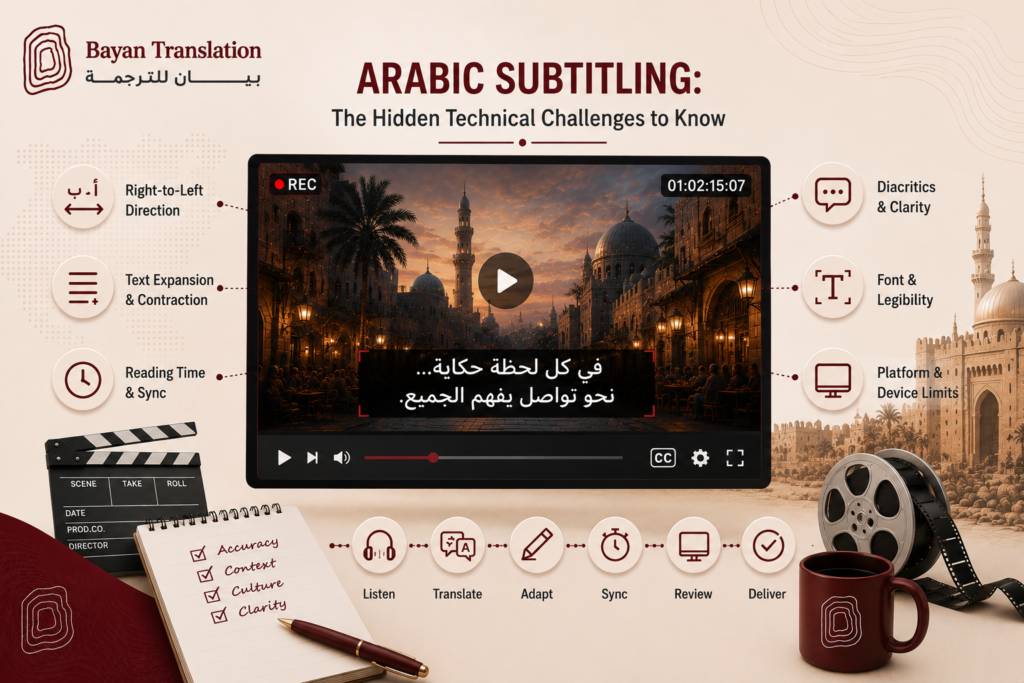
Arabic subtitling looks simple until you try it — then right-to-left text, reading speed, dialect, and on-screen graphics collide in ways that break most automated tools and inexperienced vendors. Getting Arabic subtitles right is a technical craft as much as a linguistic one, and for brands publishing video across Egypt, Oman, and the Gulf, the difference between professional and amateur subtitling is immediately visible to every viewer.
Right-to-left rendering and mixed text
Arabic reads right to left, and subtitle files, players, and encoders do not always honour that correctly. The most common failure is bidirectional text: an Arabic line containing an English brand name, a number, a percentage, or a URL can render in the wrong order, so “iPhone 15” or a phone number appears reversed or scrambled. Proper subtitling applies Unicode bidirectional controls and tests rendering in the actual target player, because a file that looks perfect in one editor can break in another.
Reading speed and line length
Subtitles must be readable in the time they are on screen. The industry works to characters-per-second and characters-per-line limits, and Arabic complicates this: a faithful translation of fast English dialogue is often longer, forcing the subtitler to condense meaning without losing it. Cramming too many characters on screen, or flashing lines too briefly, makes subtitles unreadable — so skilled Arabic subtitlers are editors as much as translators, distilling speech into tight, natural, readable lines.
Dialect versus Modern Standard Arabic
One of the biggest editorial decisions is register. Modern Standard Arabic (MSA) is universally understood and suits documentaries, corporate, and formal content. But drama, comedy, and social content often feel stilted in MSA, where a regional dialect would land as authentic and relatable. Choosing MSA or a dialect — and which dialect — depends on the audience and content type, and it materially affects how the video is received. This is a judgement professional linguists make; automated tools cannot.
Timing, segmentation, and shot changes
Good subtitles respect the rhythm of the video. Lines should be segmented at natural linguistic breaks, synchronised precisely to speech, and ideally not span shot changes, which jars the viewer. Arabic’s sentence structure differs from English, so segmentation cannot simply mirror the source timing — it must be re-thought for how Arabic phrases naturally divide, or the subtitles feel disjointed even when the translation is accurate.
Fonts, positioning, and on-screen text
Arabic requires fonts with full letter-shaping and diacritic support; a font that lacks proper Arabic glyphs produces disconnected or broken letters. Subtitles must also avoid clashing with burned-in on-screen graphics, lower-thirds, or existing text — sometimes requiring repositioning. When the video itself contains Arabic on-screen text (titles, captions, signage), that too must be handled consistently with the subtitle style.
File formats and platform requirements
Different platforms demand different subtitle formats — SRT, VTT, TTML, and others — each with its own capabilities and quirks for Arabic encoding. Files must be saved in UTF-8, and the workflow must preserve RTL integrity through every export. A subtitle set delivered in the wrong format or encoding can display as question marks or boxes, so matching the deliverable to the destination platform is part of the job.
Quality control on the real video
Arabic subtitles cannot be signed off in a spreadsheet. Final QC must happen on the actual video, in the actual player, checking rendering direction, timing, reading speed, line breaks, and any mixed-language segments in context. This is where most subtitling problems surface — and where experienced vendors catch them before publication.
How Bayan Translation delivers Arabic subtitling
Bayan Translation provides professional Arabic subtitling and captioning — translation, condensation, timing, RTL-safe encoding, dialect selection, and in-context QC — for corporate video, e-learning, entertainment, and social content across Egypt, Oman, and the Gulf, with native linguists and ISO 17100 & ISO 9001 quality.
Automatic captions are not enough for Arabic
Auto-generated captions from video platforms perform poorly in Arabic. They struggle with dialect, mis-hear technical terms and names, ignore reading-speed limits, and frequently render bidirectional text incorrectly. For internal or throwaway content they may suffice, but for anything brand-facing, published, or commercial, they undermine credibility. Professional subtitling — with human translation, condensation, and QC — is what separates a polished Arabic video from one that looks careless to native viewers.
Accessibility and SEO benefits
Beyond comprehension, accurate Arabic subtitles widen your audience and improve discoverability. They make content accessible to deaf and hard-of-hearing viewers, help the large share of users who watch video muted on social feeds, and give search engines and platforms a text layer to index — improving how your Arabic video is found. Well-made subtitles are therefore not just a translation cost but an investment in reach, inclusion, and search visibility across the region.
Planning subtitling into your video workflow
The smoothest projects share source files, scripts, and any glossary of names and terms up front, and flag on-screen graphics so subtitles can be positioned to avoid clashes. Deciding register (MSA or dialect), target platforms, and delivery formats before work begins avoids expensive rework. When subtitling is planned alongside production rather than bolted on afterwards, the result is faster, cheaper, and noticeably higher quality.
Choosing an Arabic subtitling partner
When evaluating a vendor, look for native Arabic linguists with subtitling experience, a clear position on dialect versus MSA, RTL-safe tooling, in-context QC on the real video, and delivery in the exact formats your platforms require. Ask to see a short sample on your own footage before committing to a large project — it is the fastest way to tell professional subtitling from an automated shortcut, and it protects the quality of every video you publish for Arabic audiences.
FAQ
Should my subtitles be in MSA or dialect? It depends on your audience and content — we advise per project; formal content usually MSA, entertainment often dialect.
Can you fix reversed English words in Arabic subtitles? Yes — correct bidirectional handling is a core part of professional Arabic subtitling.
Which file formats do you deliver? SRT, VTT, TTML, and platform-specific formats, all UTF-8 and RTL-safe.
Publishing video for Arabic audiences? Request a free quote.